
Bank reconciliation for housing societies: match your books to the bank, line by line
HousingMS Team · 3 Nov 2026 · 5 min read
Every treasurer has had this moment: the bank says one number, the society's books say another, and the AGM is three weeks away. The gap is rarely fraud. It is almost always a handful of entries that reached one side and not the other. Bank reconciliation is simply the habit of finding those entries every month, while they are still easy to remember.
What bank reconciliation means for a society
Your bank statement lists every rupee that moved through the society's account. Your books list every receipt and expense the committee recorded. Reconciliation is putting the two side by side for the same period and explaining every difference, until the closing balance in the books matches the closing balance in the bank, or the difference is fully accounted for.
Auditors ask for it, and many co-operative housing societies are expected to keep a bank reconciliation statement with their accounts. More importantly, it is the earliest warning you get when a payment has been missed, recorded twice or credited to the wrong flat.
The six usual reasons the numbers don't match
- Cheques that bounced. The bank credits a member's cheque, then reverses it a day or two later as "returned" or "rejected". If the receipt was already issued, the books still show the money.
- Bank charges and interest. SMS charges, cheque book fees, NEFT charges and FD or savings interest appear on the statement first. Nobody records them until someone notices.
- Cheques and transfers still in transit. A cheque issued to a vendor on the 30th may clear on the 3rd. For a few days the books are lower than the bank.
- Payments received but not recorded. A member pays by UPI or NEFT with no flat number in the remark. The money is in the bank, but no receipt exists.
- Expenses paid but not entered. Electricity bills on auto-debit, a vendor paid from the bank app, petty cash top-ups.
- Typing mistakes. ₹2,900 entered as ₹9,200, or one receipt entered twice.
Almost every difference you will ever find falls into one of these six groups.
A 30-minute monthly routine
Step 1. Fix the period. Reconcile one calendar month at a time, for example 1 to 31 August. Download the bank statement for exactly those dates.
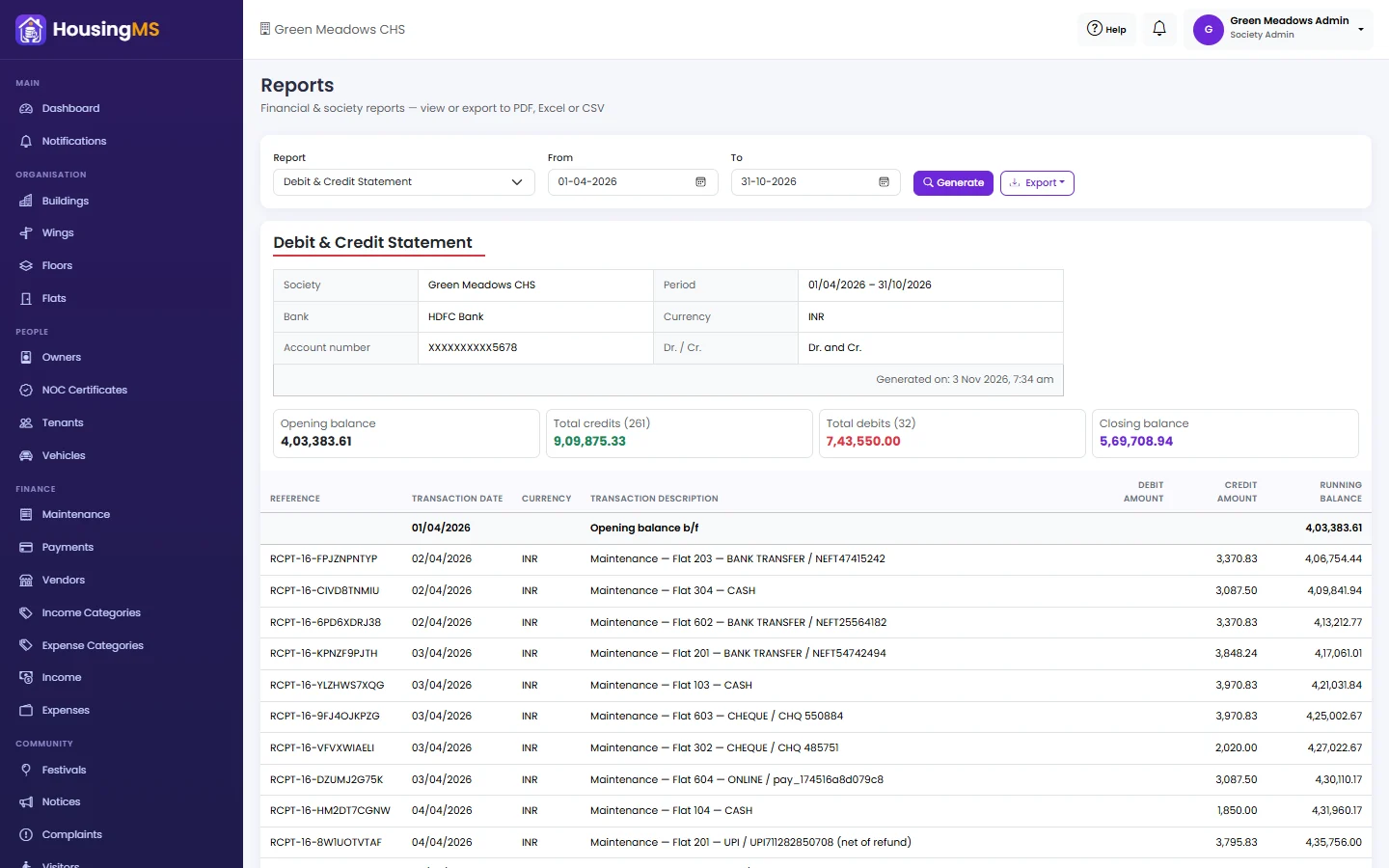
Step 2. Produce your books in the same layout. It is far easier to compare two documents that look alike. In HousingMS, open Reports → Debit & Credit Statement, choose the same From and To dates, and you get the society's own entries in bank format: reference, transaction date, description, debit amount, credit amount and running balance, starting with an Opening balance b/f row.
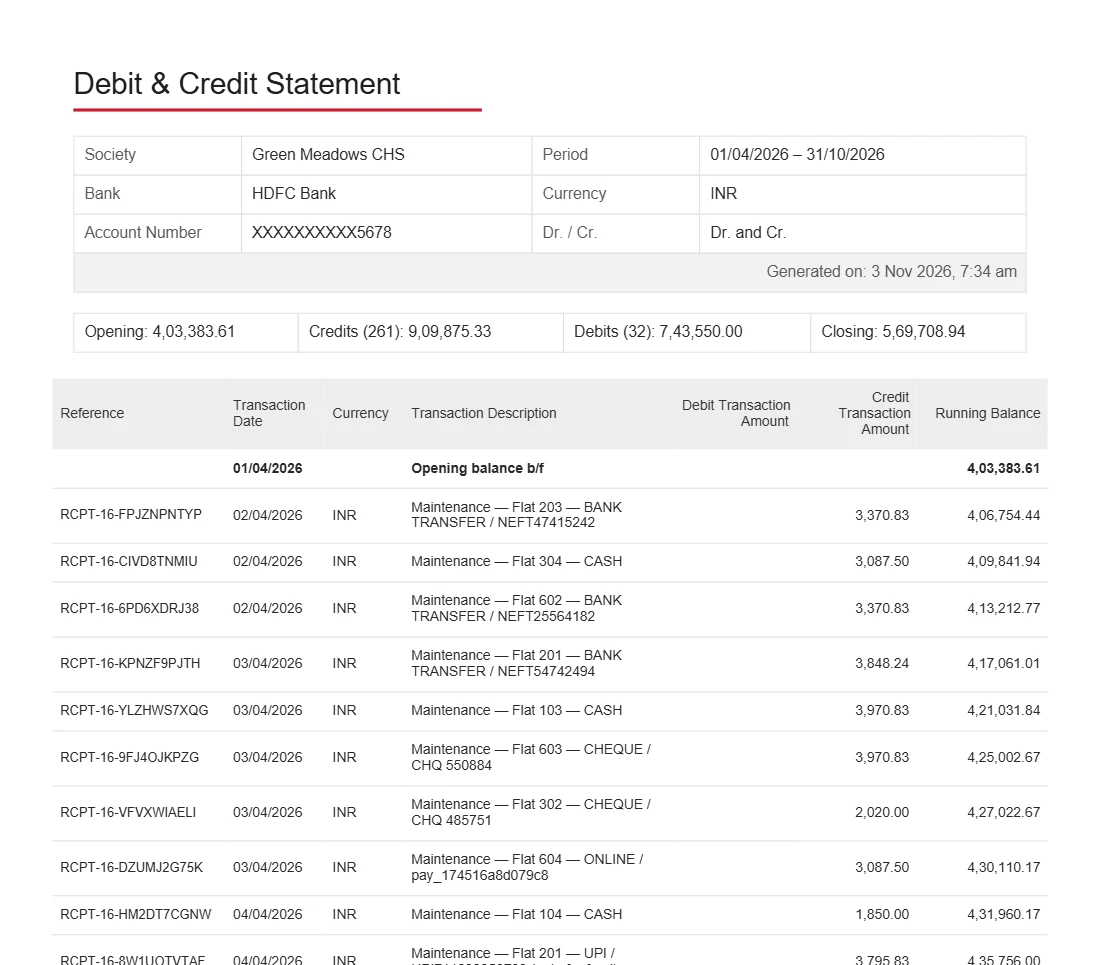
Step 3. Check the opening balance first. If last month was reconciled, the opening balance in the books should equal the bank's closing balance for last month, adjusted for any items you already knew were in transit. If it doesn't, fix last month before going further.
Step 4. Tick off the credits. Maintenance receipts carry their receipt number and payment reference (UPI, NEFT or cheque number), so most will match in a few seconds. Mark every credit that appears on both sides.
Step 5. Tick off the debits. Do the same for expenses: security agency, electricity, lift AMC, housekeeping and repairs.
Step 6. Explain what is left. Every unticked line goes into one of the six groups above. Bounced cheques reverse the member's payment, so the flat shows as due again. Bank charges and interest become an expense or income entry. Unidentified credits go on a short list for the committee to trace.
Step 7. Write it down. A reconciliation is only useful if the next treasurer can follow it. Note the date, the two closing balances, and each reconciling item with its amount.
Make next month easier
- Ask members to put their flat number in the payment remark. "A-402 Aug maintenance" saves the treasurer ten minutes per payment.
- Collect online where you can. Payments made through the society's payment link are matched to the bill automatically, with no remark needed. See online maintenance payments.
- Enter expenses the day you pay them, with the vendor name, so the description on your statement reads like the bank's.
- Import the bank statement. HousingMS can read a bank statement CSV, classify each line as income or expense and post the missing ones to the books after you review them.
- Reconcile monthly, not yearly. Twelve small reconciliations are easier than one big one in March.
What auditors look for
Auditors usually check that the closing bank balance in the books agrees with the bank certificate on 31 March, that every reconciling item is explained and dated, and that old unexplained items do not keep rolling forward. A clean month-by-month trail of statements, with the reconciling items written down, answers most of their questions before they ask.
Frequently asked questions
How often should a society reconcile its bank account?
Monthly. Differences are easiest to trace while the month is still fresh, and a monthly habit makes the year-end audit much quicker.
Who should do the reconciliation?
Usually the treasurer or the society's accountant. A second committee member reviewing it once a quarter is a simple, effective control.
Can the software reconcile automatically?
It does most of the matching for you. Online payments are linked to their bills automatically, and the statement gives you a bank-format view of the books. A person should still review the unmatched lines, because only the committee knows whether an unknown credit is a member's payment or a refund.
Read more about keeping society accounts audit-ready, or see how society accounting in HousingMS works.